Sunday, March 4, 2012

Bitdefender Total Security 2012 Review – I) Installation

Well you might be surprised and ask why I am doing a Security Product review suddenly? So before you ask let me tell … I had been contacted by Bitdefender and asked if I wanna write a review on their product Bitdefender 2012 Security Suit. I have used lots of other Antivirus and Software Firewalls but I had not used Bitdefender, I thought ok I will give it a shot on one Testing windows PC to see how it works.

Surprisingly when I registered one License key from Bitdefender, They were generous to provide me with 5 more keys to give to my friends. Well those keys are already distributed to friends so don’t ask me for a key :-)

Since I am too lazy to write the whole review at a time I thought to do it in pieces. So I will start with installation process of this and in later part I will cover other aspects of this suit.

I have made signs as bellow
-ve point = Negative Point (Whatever I did not like)
+ve point = Positive Point (I liked this)

This was the system config of the machine where I installed Bitdefender 2012 Total Security suit
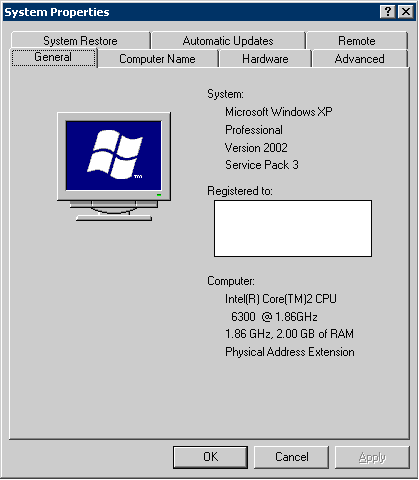

The Installation:

1) No offline Installer (-ve point)

First point I noticed about the setup that it was completely online installer. Either there is no offline install or I am not able to found the offline installer for Bitdefender 2012 Security Suit. Well this is a negative point in my opinion. I had given a of Bitdefender to one of friend who’s PC was infected by some virus and he didn’t wanted the PC do be connected to Internet. But since no offline installer was found he didn’t installed Bitdefender Suit on his PC. L

2) Check conflicting products (+ve point)

Check for Other security product that might conflict with Bitdefender and runs uninstaller for those products. In my case I had Zonealarm and Avast Antivirus on the test machine. Bitdefender installed automatically run the uninstaller for both the conflicting products.

3) All products not uninstalled at one go (-ve point)

Only glitch in this I found that after uninstalling one product it only gives reboot or stop installation. It didn’t give option to uninstall all products at once and have only single reboot.

4) Not all conflicting products were uninstalled automatically (-ve point):

The Zonealarm Firewall was uninstalled properly via the Bitdefender setup, but some how it was not able to uninstall the Avast Antivirus which was present on the system. There was some error and at the time of removal of avast and PC got hanged. I don’t say it is bitdefender problem , it might be a M$ problem. I had to manually remove Avast Antivirus after reboot so the Bitdefender setup could continue.

5) First Uninstall other product then download setup: (-ve point)

According to my opinion this is a bad strategy to uninstall all the other antivirus and firewall first and then start downloading the setup files needed for continue setup. So if I get some problems downloading setup files (which I got when I was installing) then my PC is online without security products which I don’t like. I think the setup should download the files needed first then go for uninstallation of the other security products.

6) Download slow and problems continuation: (-ve point)

Bitdefnder download too Sooooo long, I went to sleep while it was downloading. On a normally 25 KB/s test connection Bitdefender setup was showing only around 10 KB/s


First I thought it was network trouble but when I started a normal download it was getting around 24KB/s


And I have tested it on multiple computer over multiple internet connections download speed of the installers seems to be a persistent issue. One other location where I installed it on the friends laptop the internet was getting disconnected quiet often. On that machine for hours I was trying to complete the installation.

7) Unable to copy or Save Licensing terms and conditions: (-ve point)

The Licensing terms and conditions is not allowing to save or copy the terms and condition that the user is agreeing to.


8) Too much time taken for first system scan (-ve point):

I have used lots of Antivirus for Bitdefender has taken most time to install on to the system. After its download has finished the setup was showing it is scanning system files for virus.


The system file scan started at 10:40 PM. It didn’t showed any progress till some minutes. I left the PC and gone to do some other work. I came back to PC after around 25 minutes and still it was not showing any progress on the progress bar.


For PC with good configuration as given in the start, I don’t think it should take that much amount of time to scan the system files.

It was around 11:20 PM and the progress bar still didn’t showed any kind of progress. L

So I was getting irritated and decided to go for sleep and do the installation some other day when I had time. But I decided to let the setup run but I didn’t know how much exact time it took to complete the setup. But at least it was completed when woke up the next morning


I will do some other tests on this suit and write about it in some days.

Do left your comments on your experience of Bitdefender if you have used it.


Saturday, January 14, 2012

python script to download files via google search

Just now some one was asking to me on chat if there is some script which can download the files if given a google search query.

When thinking I suddenly remember that I had coded such a script some time ago using xgoogle libray of python. So I just searched for my script and here it is.

As you know I am lazy, I have used xgoogle and not directly handle google via httplib or urllib etc etc. My script used getopt library to parse the options given to the script. (again I am lazy)
(xgoogle library can be downloaded at http://www.catonmat.net/blog/python-library-for-google-search/)

The general syntax of this script is

python gsrchDwn.py --query "query_text" [--ftype file_extension] [--cnt contine_result_number] [--dir download_dir]

usage: python gsrchDwn.py --query maths made easy --ftype pdf

IMP Notes
1)It proper results are not got try the query in " (double quotes)
2) This file need xgoogle library found at http://www.catonmat.net/blog/python-library-for-google-search/

If --dir is not given it will download files into current directory.
If the script is stopped inbetween you can continue from the last result number by using --cnt result_number

This time I am have become a good boy and also added a status printing which shows how much percentage of current file is downlaoded.

grsrchDwn.py can be downloaded HERE

Let me know any comments.

Monday, December 5, 2011

Python script to check valid email addresses

We were having discussion about checking a list of email addresses for validity.
one of member had posted a bash script for Linux to verify the email addresses before sending the emails.

I thought to write a python script for the same in windows. Well this script can be easily ported to linux with just one or two lines changed. But I was too tired after all day office work to write check for OS and write windows as well as linux code. Currently it is only for gmail domain. But can be easily ported to every domain. Just need to extract domain from email id and check its MX by the existing code. (I told you already I am tired to write more code)
If some people found this useful and need sophisticated version then I would release a next version of program.

This python code take one argument which is list of emails one per line in text format.

You can download python file HERE

Thursday, December 1, 2011

Control PC through TV Remote Control

Recently I attached a LCD screen to my PC to watch Movies.

While watching movies I came across the fact that I was only able to adjust Volume, Color, Contrast, etc. TV features only.

Whenever I had to play/pause the movie or control media player I had to go towards the PC keybord / mouse. I found it very irritating. Then I thought why not use the Teensy (I had got some days ago) to code something using Infra Red Receiver. So I went to my favorite electronics shop and inquired for Infra Red components. I got one IR LED and one IR Receiver (TSOP1738)
TSOP1738 Manual Here

IR Reciver Pinout:


Surprising to me this Receiver was very cheap (converted to US$ 0.40$), when I checked some circuit ideas online only this IR receiver + Teensy was needed in the circuit.

The Teensy Pinout for Arduino is as shown bellow


The circuit is so simple. Just connected GND to GND Pin of Teensy and Vs to +5v pin of Teensy.
Pardon me for such rough circuit diagram but , I didnt thought I should waste more time in circuit diagram of so simple circuit. If any one has some doubts drop me a comment and I would provide answer to queries.

Rough Circuit Diagram


After that there I used a sample program that comes with IR Library with little but modification to blink built in LED on the Teensy Bord. This Infrared dump program can be find HERE
Then I pressed buttons of Remote and Noted down the Code received by IR Circuit.

Then I wrote a new program that can control the Media Player Classic which I use to watch movies. I coded shortcut keys used by Media Player Classic in my program and executed them when received the particular code of the Remote Key.

Then I remember reading somewhere that Teensy can also move mouse. So I went ahead and mapped the Remote Directional keys to mouse. I used Mouse.move(x,y) function and mapped 4 movements of mouse to the four directional keys found on my Remote.

So the is TV remote used to control Media Player Classic and also Mouse Movement on PC.

My Code can downloaded HERE

Photo of my Circuit looks like bellow


Tuesday, September 20, 2011

Automate irritating ISP login

Well recently my ISP updated their systems and made compulsory web login before giving access to any other site. I found this very frustrating and didnt liked it. Every time I start my modem I have to login to this ISP web login form.
So I just think to automate this process, I wrote a small python script to automate this login process. So as per my convenience I can put it in auto-run after login or whatever I want. Since I am lazy programmer I searched for a library which gave me easy manipulation of web forms. So I found mechanize module for python doing things which were necessary for this script. (Dont ask me why python , I dont want to start unother python Vs xyz Language fight. I like python very much so python :-) )

For easy usage of script I will briefly describe 5 parameters which are needed to be set one time before using this script.

loginURL = "http://login.example.com" # URL to Login form of ISP site

Here you have to put URL of the login page where the login form is shown

loginID = "myUserName" # ISP user name
loginPassword = "mYp4ssw0rd" # ISP Password

Quiet self explanatory : Username and password

loginFormName = "loginForm"

On the login page of the ISP site, check the html code for
tag put the name of the form in this location


successString = """NOW ACTIVATING YOUR SERVICES"""

Do a manual login and check the first page shown after login and copy any string from that page which is shown every time you login. This is used to check whether the login was successfull.

Comments are welcome.

Download script here
PythonScript ISPlogin.py

Monday, September 12, 2011

SL4A:The Scripting Layer for Android

SL4A enables it to support many scripting language
interpreters. In order to make practical use of SL4A, we will need atleast
the rudiments of one high-level scripting language such as Python, Ruby, Perl, Lua,
JavaScript, or BeanShell.

For me it meant ability to create and run python scripts on my phone without having to ROOT the phone. It makes possible to use lots of GUI like Checkboxes, Radio buttons, Inputbox very easily. I checked out some sample scripts and they were small and simple scripts just like normal python.

For ex. only 4 lines code was able to speak time using text-to-speech engine. Mind it two lines of them were import statements :D

import android
import time

droid = android.Android()
droid.ttsSpeak(time.strftime("%_I %M %p on %A, %B %_e, %Y "))


I found out about python scripting on android after months of buying the android phone :D
I feel ashamed of myself for not finding out this long ago. Well there were some battery problems with phone so had to give it back to service center two times. But it feels great now.

Better than that it allows directly creating & editing the scripts directly on phone also :-D

So I would be starting some scripting on python. If done anything interesting I will post it.

Wednesday, November 3, 2010

What not to do...Job Seekers

and offcourse some to do...

Well I have seen a large number of Resumes and also taken interivew of lots of candidates. I wanted to give some thoughts about to do / not to do about the resume, telephonic conversation, interviews. Others are welcome to add / discuss any points.

Resume

1) Keep your point wise

a. Don’t keep paragraphs of information regarding your skills or background.

b. Always keep information point wise.

2) Highlight the key skills for the job for which you are applying. If you looking jobs in multiple fields (Ex. Developer / Tester / Etc.) keep different resume ready for each field. Each field would have some different skills which you need to highlight.

3) Don’t put too much of information in resume. Also what ever tool / skill / project you have put in to your resume you should be able to answers any question regarding to that.

4) In my experience half of the interview questions would come from what you have written in the resume.

Telephonic Conversations

1) Be professional always ask the basic information like job profile , job location in the first place.

2) If the job profile and job location meets your need then only take forward the talks. Other wise you would be wasting your and other party’s time as well.

3) Always make a note of Name of the person with whom you had conversation for future reference

4) When you give time to any person for telephonic conversation, keep you mobile reachable, well charged. Its not good to give these reasons for not attending the call.

Face to Face Interview

1. Do dress decently in official dress.

i. Even if the office is using casual dresses

ii. Interview is not the place to show off with casuals

2. Carry a copy of resume with you and 2 photographs even if not asked by the company. You don’t know when they would come in handy

3. Do ask permission before going in to the interview room

4. Do not seat down before you are asked to do so

5. If interviewer offer shake-hand give a firm shake-hand.

6. Listen carefully to the question asked , if you don’t able to listen to a question politely ask to repeat the question

7. But don’t ask every time to repeat the question , some time its ok not every time.

8. Do answer with truth, if you don’t know any thing admit it that you don’t know it. No one is perfect.

9. Study the basics well before going for interview.

i. Ex. If you going for Developer interview you should know the basics of the programming language.

ii. If you going for Networking / Security profile your networking knowledge should be sound. (Ex TCPIP / ISO Layers etc). For a fresher at-least there is no excuse to Not have knowledge of TCPIP